
WHAT IS
3D RAD?
CLICK HERE
TO FIND OUT!
Projectile
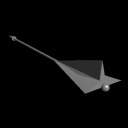
The Projectile object allows you to shoot a series of RigidBody objects linked to it, one after the other, towards the direction specified by the arrow, at a specified speed.
The shooting action is performed as soon as the Projectile object is started by another object (like EventOnInput) or by a Script.
A parameter on the Projectile object's property dialog allows you to set bullet lifetime. When a RigidBody bullet has expired (lifetime elapsed) it will disappear and will become re-usable (shootable again).
In the Virtual Editor, the Projectile object is an arrow you can orient or attach to any moving object, like a Car object (see ProjectileDemo sample project).
The arrow can also be attached to animated character bones, like the arm of a soldier (see SkinMeshBoneProjectilesDemo sample project).
An internal parameter for the Projectile object contains the object handle of the RigidBody bullet that has just been shot and another the handle of the RigidBody that has just expired. This allows a script to hide/show/start/stop any object related to the bullet when it is shot or when it disappears (see ProjectileObjectInternalParams sample project).
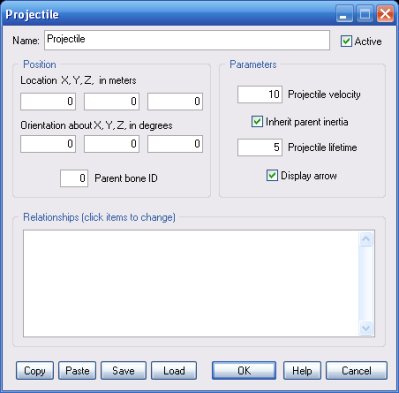
The speed at which each RigidBody object will be thrown, in meters per second.
Important! Very fast RigidBody objects may fail to properly rebound against solid surfaces and go through them, due to limits with CPU's finite math calculations. A typical workaround is using an EventOnContact object to hide the bullet as soon as a collision is detected for it (see ProjectileHideOnContact.3dr sample project).
When un-checked, this option prevents the projectiles from being affected by the parent object speed.
Time, in seconds, after which a RigidBody bullet gets re-usable, after it has been shot.
If this parameter is zero, bullets will become re-usable as soon as all others have been shot.
NOTE: if a projectile is hidden by another object (like EventOnContact) it expires, thus becoming re-usable immediately.
Check this option to visualize the Projectile object arrow run-time.
This list defines how the Projectile object relates to the objects linked to it. The following relationship types are supported:
The following internal parameters can be accessed by using event objects like EventOnValue or Script:
