WHAT IS
3D RAD?
CLICK HERE
TO FIND OUT!
Force
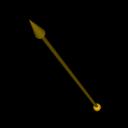
This object allows you to visually apply forces to any 3d object which supports physics, like, for example, RigidBody.
Direction and application point of the force can be set in the Virtual Editor.
Intensity of the force can be controlled dynamically by using any object supporting internal-value manipulation, like Script.
To apply a force to an object, simply link it to the Force object and set it as the recipient in the Force's property dialog.
You link objects together in the Object List (left side of 3D Rad main screen), by selecting an object and then checking the other objects you want to link to it.
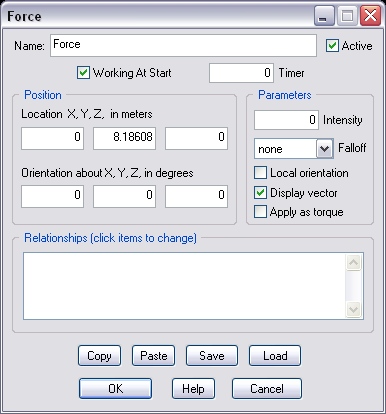
If this option is not checked, the force will be applied only when the Force object is started by another object, like for example EventOnInput.
If this parameter is greater than zero, the force will only work for the specified amount of time, in seconds. The object can then be re-started by another object, like for example EventOnInput.
NOTE: run-time, the timer is re-initialized to the specified value whenever the object is started or reset by another object.
The amount of force to apply.
Keep in mind that the resulting movement depends on various factors, including recipient object's total mass, mass distribution, application point, damping factors and other concurrent forces that may be applied to the same object.
Important! Setting forces too strong may disrupt the simulation and cause relevant loss of performance (bad frame-rate).
If set to distance the intensity of the force will be proportional to target object's distance.
If set to 1/^distance the intensity of the force will be inversely proportional to the square of target object's distance.
If this option is checked, the direction of the force will follow recipient object rotations, basically acting as a booster attached to the recipient object.
If not checked, the force will either keep its original global orientation or point towards the target object.
Check this option to visualize the force run-time.
If this option is checked, the force is changed into a torque, that is a rotational force applied about an axis passing through the recipient object's center of mass.
If no TARGET objects is specified, the rotation axis is defined by the Force object's orientation (the yellow arrow in the Virtual Editor). The axis is static if Local orientation is unchecked. It rotates with the recipient otherwise.
If a TARGET object is specified, the torque is used to orient the recipient object's front side(*) towards the target object. The yellow arrow is used as reference rotation axis for this action. The axis is static if Local orientation is unchecked. It rotates with the recipient otherwise (not recommended).
(*) Recipient object's front side faces the Z+ direction (cursor blue arm) when the object is loaded into 3D Rad's virtual space. It depends on how the 3d model was oriented when it was exported from the application used to make it.
This list defines how the Force object relates to the objects linked to it. The following relationship types are supported:
Note that target objects are ignored if the Local orientation option is checked and Apply as torque is unchecked.
Note that the intensity factor (see above) specifies the maximum amount of force to use when the input control is activated (key pressed, joystick pulled, etc)
The following internal parameters can be accessed by using event objects like EventOnValue or Script:
