
WHAT IS
3D RAD?
CLICK HERE
TO FIND OUT!
EventTimer
This object starts/stops (or shows/hides) objects linked to it after a specified time has elapsed. Start/stop action can be repeated any number of times and time intervals can be made random.
In addition, this object can itself be started and stopped by other objects, to achieve more articulated time-based event management.
Typical usage includes timed events like opening a gate at random times, game-level termination, and so on.
For more about event objects in general, please see this tutorial.
To add a timer to an object that supports starting and stopping of actions, simply add the EventTimer object to your project, link it to the target object (or objects) and then double-click EventTimer in the Object List to open the following property dialog:
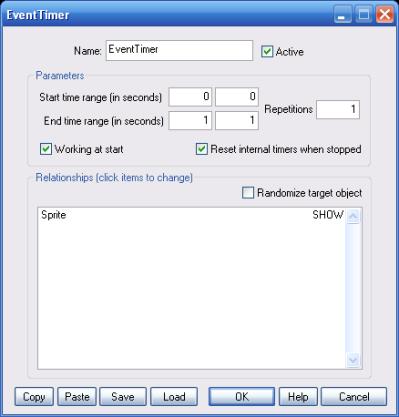
This range sets the initial value for the Current time parameter (see INTERNAL PARAMETERS section, below). The range should be set to zero if this internal parameter is not used.
If the start time range values are not identical, the initial time will be randomized within the specified range.
This second range sets the EventTimer object's duration. If the end time range values are not identical, the duration will be randomized within the specified range.
Basically, the EventTimer object will start/stop the target object[s] after the specified period of time.
Note that the actual duration is the absolute value of (End time - Start time). Start time can be bigger than End time and negative values are allowed for both ranges.
If this value is bigger than 1, the start/stop action is repeated at regular (or random) intervals for the specified number of times. Typically, repetitions are used with the SWITCH setting (see Relationships, below).
If this option is not checked, the timer will not work until it is started by using another object. This feature allows you, for instance, to create chains of EventTimer objects and create more complex timed actions, like for example opening and closing of a gate every 5 seconds, but only when 3 minutes have elapsed since the project is run.
If this option is not checked, the internal timers (see INTERNAL PARAMETERS below) are not reset when the EventTimer object stops or is stopped by another object. The internal timers are always reset when the object is started though.
This list defines how the EventTimer object relates to the objects that are linked to it, in the Object List (left side of 3D Rad main screen). The following relationship types are supported:
If this option is checked, the specified action is applied to one target object only, picked randomly. If the option is not checked, the action is applied to all target objects instead.
Additional timer functionality is provided by this object through its internal values. The additional timers are reset every time the EventTimer object is started (or re-started). They are stopped when the object is stopped. Timers state can be read run-time by using for example ValuePrint.
