
WHAT IS
3D RAD?
CLICK HERE
TO FIND OUT!
Counter
You can use this object to keep track of game parameters like current score, player lives, health and so on, without using a script.
When the Counter object is started, for example by an EventOnCollision object, it increases its value by the amount specified in the property dialog. This amount can be a negative number, to cause decrement of the counter.
When 'reset', the Counter object value goes back to the initial value specified in the property dialog.
The Counter value can be set to be persistent across different levels in a compiled multi-project.
For an example of usage, please see the demo project called CounterObjectTest.3dr.
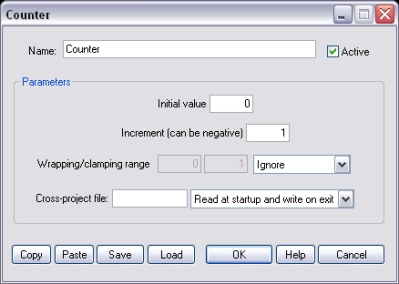
The value of the counter when the project is started or after it is reset.
The amount that is added once, whenever the object is 'started' by another object run-time. This value can be any decimal number, including non-integer amounts like 3.1734.
The counter can be set to wrap or clamp within a specified range.
If a valid file name is typed in this input box, the file will be used to 'share' the Counter value with other Counter objects that uses the same file name in a different project.
The Counter object value can be read from the file at startup, written to the file on exit or both. If the input box is empty (default), no file is created or read.
Note that this functionality only works in the compiled version of your project and cannot be tested in the editor.
The following Counter object parameters can be accessed run-time by using for example ValuePrint, EventOnValue, Script.
