WHAT IS
3D RAD?
CLICK HERE
TO FIND OUT!
Buoy
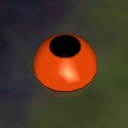
When linked to a RigidBody object, the Buoy object applies upward forces to it, to realistically simulate floating on or under a water surface, specified in the Buoy object property dialog as an altitude parameter.
Typical usage is for the creation of realistic boats. Please see the project called BoatDemo.3dr for an example.
The Buoy object position on the parent RigidBody determines the application point of the buoyancy forces.
The buoy is editable visually as a sphere. The sphere size will determine its buoyancy force.
Multiple Buoy objects can be attached to a single RigidBody (boat) object, allowing you to create complex boat setups.
By using a Script, the water plane altitude can be adjusted run-time (see Internal Parameters section, below), to make the water move up and down, for example to simulate waves.
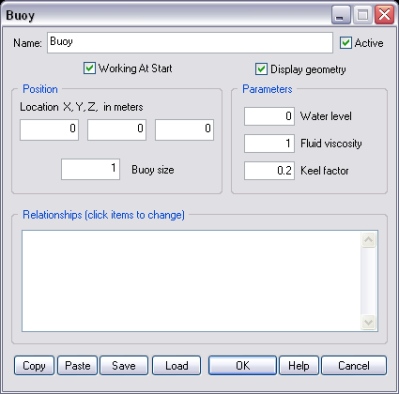
If this option is not checked, the buoyancy forces will be applied only when the Buoy object is started by another object, like for example EventOnInput.
Check this option to visualize the buoy model run-time.
The diameter of the buoy, in meters.
Buoyancy forces are proportional to the buoy volume.
Important! Applying big buoys to a RigidBody object with a small mass is likely to produce very fast translations and/or spinning that can lead to collision detection failures and even software crashes.
The altitude, in meters, of the water level. Note that each Buoy object has its own water level. This is typically the same for all Buoy objects in the scene, but the ability to set it individually for each buoy allows you to simulate uneven wave patterns, raising waters in a dam etc, where necessary.
The bigger the value, the higher the vertical drag that the buoy will experience when pushed down by the boat weight or up by the buoyancy force.
The default (1.0) is approximately the viscosity of fresh water.
Setting higher viscosity values help reduce boat wobbling/bouncing. To further stabilize a boat you can also set some angular damping for the RigidBody object the buoy is attached to (the boat). See RigidBody object help file for details.
NOTE: fluid viscosity drag is only applied along the vertical axis. There is no drag for a buoy moving on the horizontal plane (but see Keel factor).
Due to the hull shape, real boats tend to resist sideways translation.
This effect can be simulated in 3D Rad, for each Buoy object individually, by setting a keel factor bigger than zero.
For each buoy, the keel drag force is applied along the local X axis of the boat object (RigidBody). The application point position for the drag force is approximately the center of the submerged buoy volume.
This list defines how the Buoy object relates to the objects linked to it. The following relationship types are supported:
The following internal parameters can be accessed by using event objects like EventOnValue or Script:
