
WHAT IS
3D RAD?
CLICK HERE
TO FIND OUT!
Tree
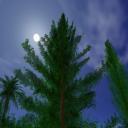
A set of ready-to-use, fairly detailed 3d trees. The models have been designed to render fast without sacrificing rendering quality. They come with modeled shadow casters and collision detection geometry.
Tree colors can be adjusted freely to simulate seasons or achieve bizarre vegetation, or they can be automatically randomized (along with height and orientation) to create realistic forests by using multiple instances of the same tree.
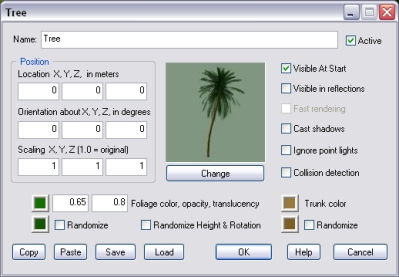
Click the Change button to set the tree type.
Unused in this version of the object.
If this option is checked, the tree will cast a volumetric shadow. This may affect frame rate on slower systems.
By default, if point lights are close enough to affect the Tree object, foliage and trunk are affected by them.
However, because rendering surfaces that are illuminated by multiple lights require much more processing power, this option allows you to disable this feature to optimize frame-rate.
Note that, for each Tree object, there is a maximum limit of point lights that can affect its surface at any given time. Please see the PointLight object's help file for details.
If this option is checked, the tree will detect collision detection with all objects linked to it.
Depending on your scene features, foliage opacity should be set to the lowest value possible, in order to minimize transparency sorting artifacts between the several 'surfaces' that form the tree. Zero means 'totally transparent', one means 'fully opaque'.
The translucency setting is used to simulate the effect produced by sunlight passing through leaves (backlighting). The value must be between 0 and 1.
If randomization is enabled for a color setting, the actual tree tint is randomly set between the two specified colors.
The Randomize Height & Rotation only works run-time and will automatically set the tree height to the current vertical scaling plus/minus 10%. It will also set a random orientation around the vertical axis.
For information about the remaining controls, please click here.
