WHAT IS
3D RAD?
CLICK HERE
TO FIND OUT!
SunLight
This object allows you to set general sunlight properties, like direction, color and shading level. It also allows you to set volumetric shadow color and intensity.
Light direction can be set by rotating the light object in the Virtual Editor.
If the light is linked to an object in the Object List, the object will become the light parent. Runtime, when the parent rotates, the SunLight direction rotates as well.
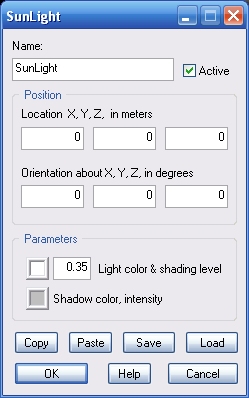
Light color & shading level. Click the color button to open the color picker. Shading level must be between 0.0 (for a totally black dark-side-of-objects) and 1.0 (for no difference between bright and dark side of objects).
Shadow color, intensity. Shadow intensity depends on shadow color brightness. The brighter the color you set, the fainter the shadow. Thus, for example, if you set shadow color to white, it will be completely invisible.
The following internal parameters can be accessed by using event objects like EventOnValue or Script:
