
WHAT IS
3D RAD?
CLICK HERE
TO FIND OUT!
Group

This object is only active in the Virtual Editor and allows you to edit multiple objects as a group, by translating and/or rotating them as a single, rigid object.
Optionally, on group rotations, you can preserve individual objects' orientation and/or location, for maximum flexibility and special editing operations.
To create a group of objects, simply add this object to your project and link to it all the objects in the group.
You can create multiple independent groups by adding to your project multiple instances of this Group object.
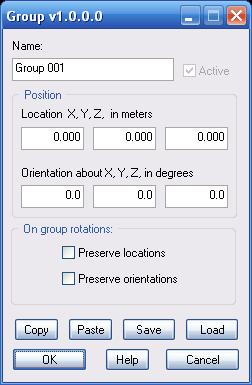
Preserve locations. If this option is checked, when rotating the group, the location of each object will not change.
Preserve orientations. If this option is checked, when rotating the group, the orientation of each object will not change.
For information about the remaining controls, please click here.
Note that, every time you open the property dialog for this object, you can only change a 'On group rotation:' setting OR a 'Position' numeric value (orientation/location) and click OK. Changing both setting types at the same time is not possible.
