
WHAT IS
3D RAD?
CLICK HERE
TO FIND OUT!
G-Force

The gravity force object applies linear acceleration to its targets, the objects that are linked to it in the Object List.
Intensity, direction and range of the force is adjustable and multiple instances of the object can be added to achieve different gravity effects in different zones of the space.
All active objects that are linked to the g-force objects in the List Editor are affected by the force, if they are within the specified range.
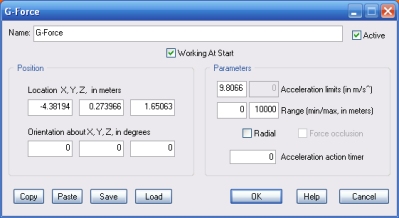
Acceleration limits (in m/s^). The intensity of the acceleration, in meters per squared-second. Default value is planet Earth gravity.
If the Radial option is checked you can specify the acceleration as a range (see below).
Range (min/max, in meters). These values are relative to the current G-Force object's location. Only target objects that are within the specified distance range are affected by gravity.
Radial. If this option is checked then G-Force object orientation is ignored. The direction of the acceleration applied to target bodies will always be toward (or away from) the G-Force object location.
The intensity of the acceleration is relative to the current target object's position, within the specified Range (see above).
So, when target object's distance is minimum, intensity is the first Acceleration limit value specified, and, when target object's distance is maximum, intensity is the second Acceleration limit value specified.
Force occlusion. When Radial mode is checked, you can optionally exclude from the acceleration action the target objects that are behind other target objects. This is useful when using the G-Force object to simulate explosion forces, and you don't want, for example, an object on one side of a wall to be affected by an explosion on the other side of the wall.
Acceleration action timer. If the timer parameter is greater than zero, the G-Force object will only work (affect target bodies) for the specified amount of time, in seconds. The object can then be re-started by another object, like for example EventOnInput. Run-time, the timer is re-initialized to the specified value whenever the object is started or reset by another object.
The following internal parameters can be accessed by using event objects like EventOnValue or Script:
