
WHAT IS
3D RAD?
CLICK HERE
TO FIND OUT!
ForceFeedback

This object allows you to control any input device supporting force-feedback.
For example you can activate the torque in a steering wheel or the force pulling a joystick.
By typing duration and intensity values in a multi-line input box, you can actually create force-feedback effects that can be triggered by events in your 3D Rad project (like a car crashing or speeding over a rough surface).
These effects can also be controlled run-time, in a more advanced way, by using the Script object.
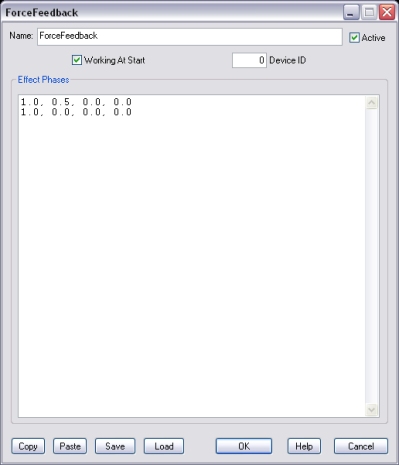
If this option is not checked, the force-feedback effect will not be sent to the device until the ForceFeedback object is started by another object, like for example EventOnInput.
This is the device to use for the force-feedback effect. Zero indicates the first connected device supporting force-feedback, 1 is the second connected device and so on.
In this window you specify the effects.
For each line of text, you must specify the duration in seconds and the force intensity values for up to 3 axes of the device. All values must be separated by a comma.
For example, the following sequence:
1.0, 0.5, 0.0, 0.0
1.0, 0.0, 0.0, 0.0
Applies a force = 0.5 to the first axis of the device for one second. Then (second line, second list of 4 values) it sets the force back to zero for another second. The sequence then starts over, looping indefinitely.
Note that intensity values must be between -1.0 and 1.0.
The actual effect produced on the device depends on device functionality. So, for example, if the device supports vibration only, the specified value will determine vibration intensity instead of pulling force magnitude.
Randomization of the intensity can be achieved by specifying additional values like for example:
1.0, 0.5, 0.0, 0.0, 0.7, 0.0, 0.0
1.0, 0.0, 0.0, 0.0
Which causes the force applied to the first axis to be randomized between 0.5 and 0.7
For information about the remaining controls, please click here.
Force intensity values can also be set run-time by manipulating internal parameters for the ForceFeedback object by using the Script object.
