
WHAT IS
3D RAD?
CLICK HERE
TO FIND OUT!


EventOnObjectId


Certain 3D Rad objects expose the identification number (handle) of other objects as internal parameters. For example, an internal parameter of the Scanner object is the ID# of the object that has just been hit by the scan.

The EventOnObjectId object will trigger an action (like starting a Particles object or a SoundEffect) as soon as the ID# matches the ID# of a specified object.

In the relationships window (see below) you can specify the function of each object linked to the EventOnObjectId.

For example, a SoundEffect object can be the object to START, a Scanner object's internal parameter the item to monitor and a RigidBody the TARGET object whose handle is checked against the Scanner internal parameter. As a result, run-time, when the scan hits the RigidBody, the sound effect is played.

Note that specifying the same object as both TARGET and object to START (STOP, SHOW etc) is possible (for example to hide an object when it is hit by a scan).

For more about event objects in general, please see this tutorial.
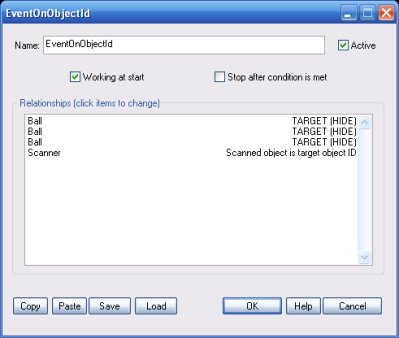


Working at start

If this option is not checked, the EventOnObjectId object will not work until it is started by using another event object or a script.

Stop after condition is met

This option is typically used to only trigger actions once, when the target is hit for the first time only.

Relationships

This list defines how the EventOnObjectId object relates to the objects that are linked to it. The following relationship types are supported:

  • IGNORE. Do nothing. Typically used for linked objects that are starters for this EventOnObjectId object itself (in a chain of event objects for example).


  • START. Start the object when the condition is met. Note that the target object must provide some 'startable' action.


  • STOP. Stop the object when the condition is met.


  • SWITCH. Switch the object (start if stopped and vice-versa) when the condition is met.


  • SHOW. Show the object when the condition is met.


  • HIDE. Hide the object when the condition is met.


  • S/H SWITCH. Switch the object (show if hidden and vice-versa) when the condition is met.


  • RESET. Re-initialize the object completely, to its default state, as defined in the project, when the condition is met.


  • TARGET (START, STOP etc). Same as above (START, STOP etc) but the specified object will also be a target. When the monitored object ID# matches this object's ID#, the action will be applied to this object. Note that actions specified for all object marked as START, STOP etc, will be performed as well.


  • TARGET. When the monitored object ID# matches this object's ID#, actions specified for all object marked as START, STOP etc, will be performed.


  • [parameter] is target object ID. Monitor the specified internal value of this object. When this value becomes identical to the object id# of an object marked as TARGET, in this list, the actions (START, STOP, etc) specified for other objects in this list are performed.


  • For information about the remaining controls, please click here.